Thread: Tech 2 Scanner hand held or GM MDI?
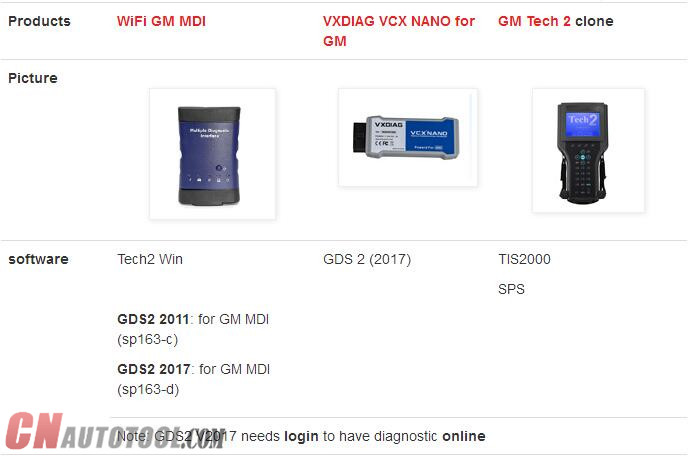
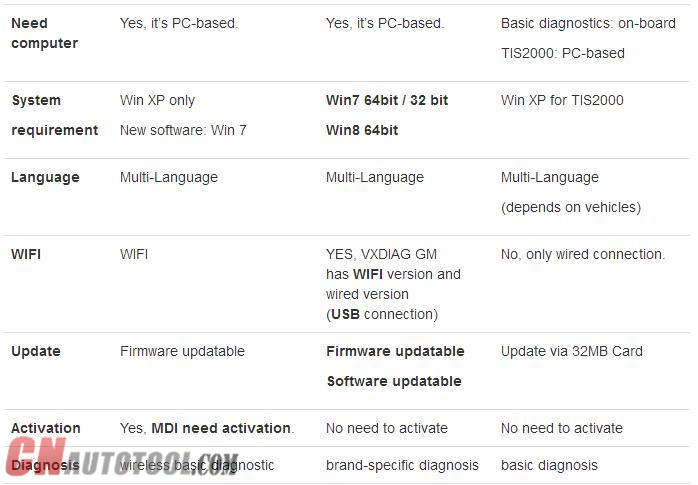
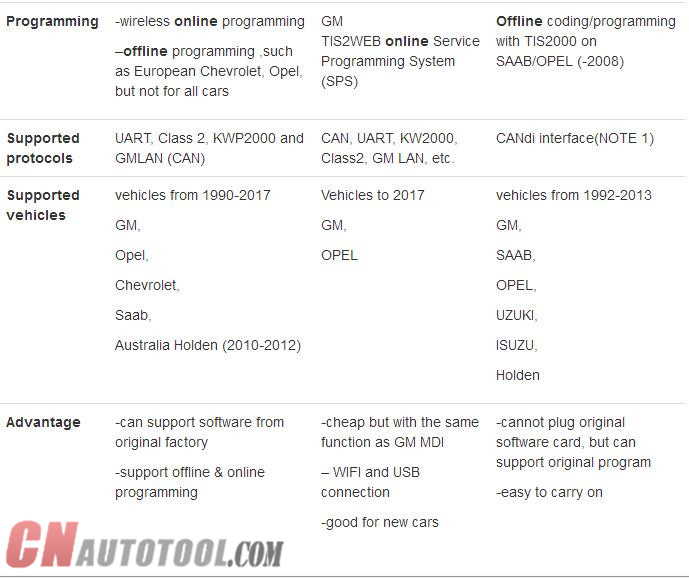
Tech2 hand held support more then Opel cars.
It support also Isuzu, Suzuki, GM and SAAB
Just changing the PCMCIA card or flash it the one you have if you have only one with the software for cars that you need.
But this tool cannot be used with GDS2 in newer cars models after 2008 (
here we are talking in newer cars as Insignia and Astra J not the
models as Corsa D 2014 wich is still supportted by the Tech 2 hand held )
GM MDI can be used as Tech2 hand held in cars from 1997 till 2014 (
but models before 2008 ) using Tec2Win emulator and can be used with
GDS2 in newer models cars as Insignia and Astra J
GM MDI doesn’t support Suzuki and SAAB
Both tools suport SPS Programming. But MDI is 20 to 70% faster
compared to the Tech 2 for SPS programming, which helps alleviate
battery drain on vehicles. This means flashing new ECU software is both
quicker and more stable,for example, re-flashing an engine ECU using the
Tech 2 could take up to 1 hour, with the MDI it’s just 10 minutes. You
can therefore flash 6 cars with the MDI in the same time as it would
take 1 with the Tech 2 ON CnAutotool.
I’m also using a HQ OP-COM clone with the lastest version of softwear
wich cover even Corsa D 2014 made in february 2014 ( it covers allmost
all functions of Tech2 for cars between 2004 – 2013 and better
connection for cars before 1997 even it is the same tool revision B
hardwear ) and an AVDI ( using Tech2win and GDS2 )
If you need a better cover my advise to you is to buy a GM MDI but the GM Tech2 hand held it is still good
Anyway in the end it is your choice-this is only my opinion
Good luck
FAQ: GM MDI vs. Tech 2
1) Will I need a subscription to use the Auto Scanner Tool MDI?
yes currently you need seperate subscriptions for tech2win(tech 2 emulator)
gds2 (newer diagnostic application for global a cars and up) and sps (reflashing)
2) Will I be able to scan and tune without a subscription?
no
3) should I sell my tech 2 and buy a MDI?
they can pry mine from my dead lifeless fingers
4) are they cloning GM MDI’s or are all the GM MDI’s I see for sale the real deal?
i have seen clone mdi’s make sure its from a reputable source
I have zero experience with the GM MDI Diagnostic Tool so any education is very much appreciated
i use my tech 2 on a daily basis (i own a repair facility)
i also use tech2win and gds2 and gm sps frequently using a cardaq-m interface
if you wanted a way to access tech2win and gds2 and sps (for factory
flash updates) the cheapest way currently is the mongoose gm 2 interface
by drewtech ($495 iirc)
however you will still need a subscription for the desired function
http://obdtools.egloos.com/2028674
Showing posts with label GM MDI Diagnostic Tool. Show all posts
Showing posts with label GM MDI Diagnostic Tool. Show all posts
Sunday, January 14, 2018

Sunday, December 24, 2017
Free Download GDS2 v17 – GM Global 2017.7.1 – MDI 8.3.103.39

17 Dec
5:41
https://mega.nz/#!LZolSKyB!4iL-8MfCZwekmAZcqcftZ5i66uPoMIHoL2nafRdGxDI
Password: MHHAUTO_GDS_07_2017
It’s customer share: (big thanks documentacao.eng)
”I’m here to share a VM that I have success to update and it’s working fine
(tested with a china clone)”
What is GM GDS2:
The GM Global Diagnostic System 2 (GDS2), a PC-based software application, is designed to diagnose and repair on-board automotive electronic systems. The software application is used with a personal computer and a GM MDI multiple diagnostic interface (or J2534-2 equivalent)
What is GM MDI:
The Multiple Diagnostic Interface (MDI), provides full dealer level diagnostics and programming for all Vauxhall /Opel 16 pin vehicles from 1996 to 2017.
What is GM Global:
GM Global incl. GM diagnostic software download, Service Programming System (SPS), Security Access (Security), Snapshot (Snap), Tech2 View (T2 View), Techline Print (TL Print), Global Diagnostic System (GDS2), PRO Code Display (RPO)…ONLY WORK WITH GM MDI with Item NO. SP163-C!!!
gm-global
GM MDI installation tips: (big thanks to SCOTT)
“Always make sure any downloaded files are unblocked
RIGHT CLICK DOWNLOADED FILES AND CLICK PROPERTY’S , Click unblock button if there, if not click cancel button.
Disable UAC and Disable firewall and reboot .
uninstall mdi manger from control panel, reboot, reinstall mdi manager , start mdi manger make sure correct firmware, close mdi manager or update firmware or do a recovery accordingly, Now leave mdi connected with 12v supply and reinstall tech2win, right click tech2win shortcut and click button -> open file location, find emulator.exe ,right click and select option to run as administrator.
close all. now replace quickstart.bin with now one.
now run program from desktop.”
CnAutotool.com disclaimer:
software above tested by the DIY user only. Professionals haven’t tested it yet. You need luck with it coz there might be some unknown risk
Tested GM diagnostic software… here you go.
Tech2 32MB PCMCIA card software download:
http://www.cnautotool.com/goods-150-Best+Quality+GM+Tech2+GM+Scanner-CANdi++TIS.html
SAAB TIS2000 software download: (with USB Key)
http://www.cnautotool.com/goods-1568-GM+Tech2+GM+Scanner+-CANdi++TIS.html
GM MDI V8.3.103.39 GDS2 Windows 7 software for Vauxhall Opel/Buick and Chevrolet:
http://www.cnautotool.com/goods-6651-GM+MDI+GM+Scan+tool+Plus+Lenovo+E49AL+Laptop+Full+Set+Ready+To+Use+High+Quality.html
You can use tested versions with relief…
All tested to work good with GM Scan tool here:
Subscribe to:
Posts (Atom)