Showing posts with label GM MDI. Show all posts

Monday, April 11, 2022

GM Tech2 vs GM MDI Diagnostic Tool

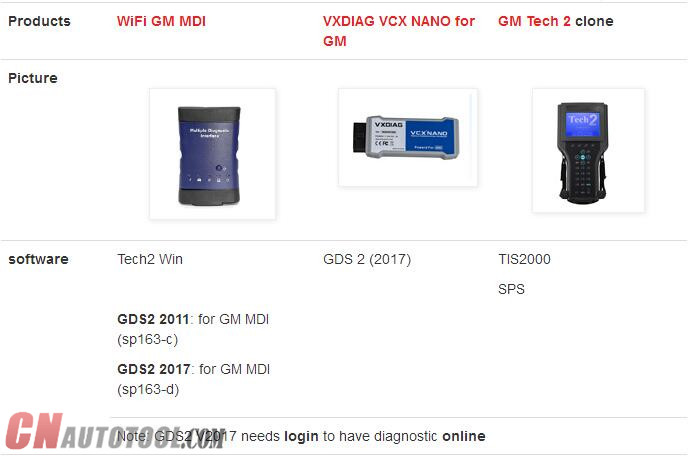
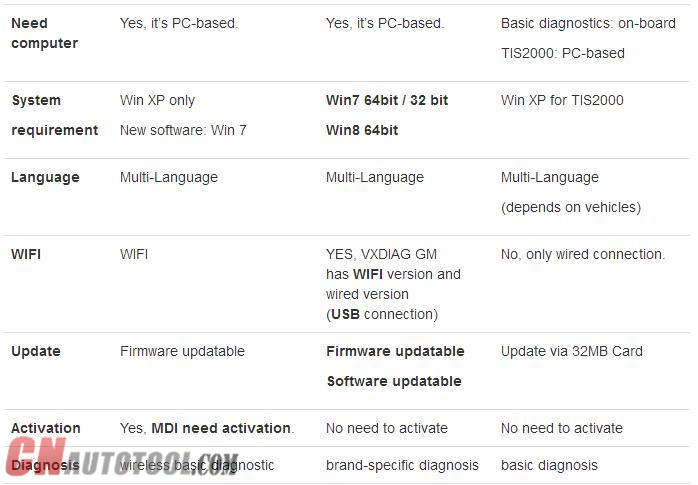
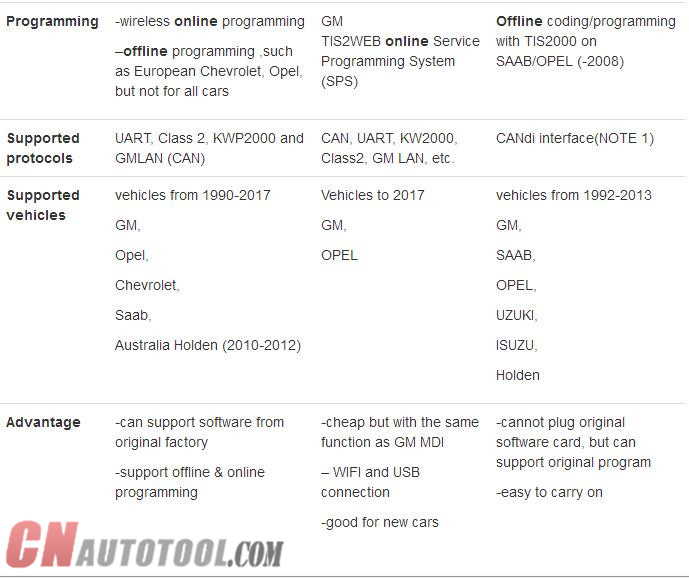
 There have GM Tech2 and GM MDI work for gm vehicles , but whats the difference for these 2 items ? Please check the details as bellow :

ItemGM Tech 2GM MDI
LanguageGM-English, Germany, Spanish , Japanese, French, Thai , Portuguese, Korean
SAAB-English
OPEL-English, Italian , Germany,Spanish
HOLDEN-English
SUZUKI-English
ISUZU-English
Multi-language: English, French, German, Japanese, Italian and so on.
Total 30 languages to choose.
UpdateVia 32MB Software Cardcan not update
Activationno need activeyes
Advantagecannot plug original software card, but can support original programcan support software from original factory
OS requirementno need connect to the PCWin XP only
Internet connectionno need connect to the PCcan not connect to the internet then install the software, because once connect internet, it will remind you update the software
Support Car ModelCannot support truck, only for cars, Support all GM systems 1992 thru current year. such as GM/ SAAB/ OPEL/ SUZUKI/ ISUZU/HOLDENMDI can test all GM car from 1990-2012 year.
Support programingsupport reprogramming, but need to use with TIS2000 togethersupport offline program,such as chevrolet,opel, but not for all cars

Sunday, January 14, 2018

Should I buy a Tech 2 hand held or GM MDI

Thread: Tech 2 Scanner hand held or GM MDI?
Tech2 hand held support more then Opel cars.
It support also Isuzu, Suzuki, GM and SAAB
Just changing the PCMCIA card or flash it the one you have if you have only one with the software for cars that you need.
But this tool cannot be used with GDS2 in newer cars models after 2008 ( here we are talking in newer cars as Insignia and Astra J not the models as Corsa D 2014 wich is still supportted by the Tech 2 hand held )
GM MDI can be used as Tech2 hand held in cars from 1997 till 2014 ( but models before 2008 ) using Tec2Win emulator and can be used with GDS2 in newer models cars as Insignia and Astra J
GM MDI doesn’t support Suzuki and SAAB
Both tools suport SPS Programming. But MDI is 20 to 70% faster compared to the Tech 2 for SPS programming, which helps alleviate battery drain on vehicles. This means flashing new ECU software is both quicker and more stable,for example, re-flashing an engine ECU using the Tech 2 could take up to 1 hour, with the MDI it’s just 10 minutes. You can therefore flash 6 cars with the MDI in the same time as it would take 1 with the Tech 2 ON CnAutotool.
I’m also using a HQ OP-COM clone with the lastest version of softwear wich cover even Corsa D 2014 made in february 2014 ( it covers allmost all functions of Tech2 for cars between 2004 – 2013 and better connection for cars before 1997 even it is the same tool revision B hardwear ) and an AVDI ( using Tech2win and GDS2 )
If you need a better cover my advise to you is to buy a GM MDI but the GM Tech2 hand held it is still good
Anyway in the end it is your choice-this is only my opinion
Good luck
FAQ: GM MDI vs. Tech 2
1) Will I need a subscription to use the Auto Scanner Tool MDI?
yes currently you need seperate subscriptions for tech2win(tech 2 emulator)
gds2 (newer diagnostic application for global a cars and up) and sps (reflashing)
2) Will I be able to scan and tune without a subscription?
no
3) should I sell my tech 2 and buy a MDI?
they can pry mine from my dead lifeless fingers
4) are they cloning GM MDI’s or are all the GM MDI’s I see for sale the real deal?
i have seen clone mdi’s make sure its from a reputable source
I have zero experience with the GM MDI Diagnostic Tool so any education is very much appreciated
i use my tech 2 on a daily basis (i own a repair facility)
i also use tech2win and gds2 and gm sps frequently using a cardaq-m interface
if you wanted a way to access tech2win and gds2 and sps (for factory flash updates) the cheapest way currently is the mongoose gm 2 interface by drewtech ($495 iirc)
however you will still need a subscription for the desired function

http://obdtools.egloos.com/2028674

Sunday, December 24, 2017

Free Download GDS2 v17 – GM Global 2017.7.1 – MDI 8.3.103.39


Free Download GDS2 v17 – GM Global 2017.7.1 – MDI 8.3.103.39
17 Dec
5:41
Hi everyone. Free download 2017 GDS2 v17.0.08000 – GM Global 2017.7.1 – MDI 8.3.103.39 GM diagnostic software for laptop to have GM diagnostic, coding, programming:
https://mega.nz/#!LZolSKyB!4iL-8MfCZwekmAZcqcftZ5i66uPoMIHoL2nafRdGxDI
Password: MHHAUTO_GDS_07_2017
It’s customer share: (big thanks documentacao.eng)
”I’m here to share a VM that I have success to update and it’s working fine
(tested with a china clone)”
What is GM GDS2:
The GM Global Diagnostic System 2 (GDS2), a PC-based software application, is designed to diagnose and repair on-board automotive electronic systems. The software application is used with a personal computer and a GM MDI  multiple diagnostic interface (or J2534-2 equivalent)
What is GM MDI:
The Multiple Diagnostic Interface (MDI), provides full dealer level diagnostics and programming for all Vauxhall /Opel 16 pin vehicles from 1996 to 2017.
What is GM Global:
GM Global incl. GM diagnostic software download, Service Programming System (SPS), Security Access (Security), Snapshot (Snap), Tech2 View (T2 View), Techline Print (TL Print), Global Diagnostic System (GDS2), PRO Code Display (RPO)…ONLY WORK WITH GM MDI with Item NO. SP163-C!!!
gm-global
GM MDI installation tips: (big thanks to SCOTT)
“Always make sure any downloaded files are unblocked
RIGHT CLICK DOWNLOADED FILES AND CLICK PROPERTY’S , Click unblock button if there, if not click cancel button.
Disable UAC and Disable firewall and reboot .
uninstall mdi manger from control panel, reboot, reinstall mdi manager , start mdi manger make sure correct firmware, close mdi manager or update firmware or do a recovery accordingly, Now leave mdi connected with 12v supply and reinstall tech2win, right click tech2win shortcut and click button -> open file location, find emulator.exe ,right click and select option to run as administrator.
close all. now replace quickstart.bin with now one.
now run program from desktop.”
CnAutotool.com disclaimer:
software above tested by the DIY user only. Professionals haven’t tested it yet. You need luck with it coz there might be some unknown risk
Tested GM diagnostic software… here you go.
Tech2 32MB PCMCIA card software download:
http://www.cnautotool.com/goods-150-Best+Quality+GM+Tech2+GM+Scanner-CANdi++TIS.html
SAAB TIS2000 software download: (with USB Key)
http://www.cnautotool.com/goods-1568-GM+Tech2+GM+Scanner+-CANdi++TIS.html
GM MDI V8.3.103.39 GDS2 Windows 7 software for Vauxhall Opel/Buick and Chevrolet:
http://www.cnautotool.com/goods-6651-GM+MDI+GM+Scan+tool+Plus+Lenovo+E49AL+Laptop+Full+Set+Ready+To+Use+High+Quality.html
You can use tested versions with relief…
All tested to work good with GM Scan tool here:
1-1 1-2 1-4
http://obdtools.egloos.com/2028435